SEO has been wildly more aggressive in the last year than it has been in the last 8 years I have been working. Primarily, it is the AI wave that has taken it by storm.
And since it is the nature of the world that whoever keeps pace with trends and moves with the times survives. Hence, I have been studying a bit lately on how AEO works. What I did was understand AI systems and what the signals are. Every time I went down the rabbit hole, I always bumped into a new term that would take me a while to grasp.
So I took on the responsibility of putting together something that would help a few SEOs out there, and maybe a few other newly joined AEO bros who are on this journey with me.
AEO (Answer Engine Optimisation)
This guide would be incomplete without AEO / GEO. AEO stands for Answer Engine Optimisation and GEO stands for Generative Engine Optimisation. I see a lot of folks using both terms interchangeably, while some call them out differently. I would use them interchangeably but am more aligned towards AEO.
AEO prepares your website so AI platforms like ChatGPT, Perplexity, and Gemini cite your brand directly in their answers.
If one had to compare with SEO, SEO gets you ranked on Google, while AEO gets you quoted inside an AI’s answer, with or without a link back to your site.
A simple example would be: a user asks ChatGPT “best CRM for small teams,” and it names your product directly in the response. That’s AEO working.
I also ran a small poll on LinkedIn to see what my connections use. Majority of them use the terms interchangeably, with a smaller group using AEO primarily (Source).
LLM (Large Language Model)
The next most common term is LLM, which stands for Large Language Model.
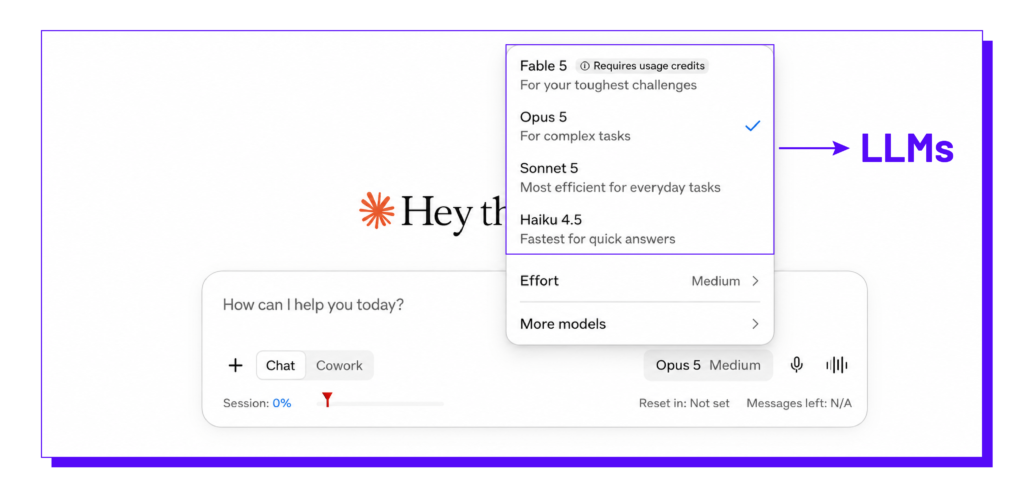
LLMs are foundation models (like GPT-4 or Gemini Flash) trained on massive datasets. They are capable of reasoning, summarising documents, and writing code, but they require fresh “context” from the web to be accurate.
The LLM is the “brain” that reads, writes, summarises, and answers questions. This is the technology that powers tools like ChatGPT and Claude. ChatGPT and Claude themselves are not LLMs; you can call them AI applications, AI assistants, Conversational AI interfaces, etc. The brain that powers them, i.e., GPT-5.5, is an LLM; similarly, Claude Opus 4 and Claude Sonnet 4 are LLMs.
Think of ChatGPT as the Samsung phone, while GPT-4 is the Android operating system powering it. You use the phone to interact with the OS, but the two aren’t the exact same thing.
Generative AI
Generative AI is a type of AI that can create new content based on patterns it has learned from existing data. The content can be:
- Text
- Images
- Audio
- Video
- Code
For text generation, the model may be an LLM. For image generation, it may be an image-generation model. Both can be used as part of a Generative AI system.
AI Bots / AI Crawlers
AI companies use web content to train their models and power their AI applications. To make this possible, they use AI crawlers, or bots, to gather online content. The gathered data trains their models and powers applications like ChatGPT, Claude, and Perplexity to generate human-like responses. When up-to-date facts are needed, crawlers also fetch live web data to ground the AI’s answers through RAG.
With the rise in AI-powered platforms like ChatGPT, Claude, and Perplexity, AI crawlers have emerged as a new class of web bots designed to collect and process online content.
Different Behavior by AI Bots
Search – Crawls and indexes your website so it can answer questions about your content later [OAI-SearchBot (OpenAI), PerplexityBot].
Example: Your website has a blog on “Best SEO Tools.” A Search AI visits today, stores information about the page, and later, when someone asks: “What are the best SEO tools?” it uses stored information to answer, often linking back to your site.
Agent – Visits your website in real time to complete a task for the user. Think of this as a personal assistant running an errand for you [ChatGPT-User, Perplexity-User].
Example: You ask: “Book me the cheapest flight from Mumbai to Delhi.” An AI agent opens an airline or travel website, searches flights, fills forms, compares prices, and may even complete the booking.
Training – Uses your content to improve the AI model itself. A chef learning new recipes from thousands of cookbooks [GPTBot (OpenAI), ClaudeBot (Anthropic)].
Example: An AI company collects millions of webpages, books, and articles, including your blog, to train a new language model. After training, the model has learned patterns from that content. It doesn’t go back to your website each time someone asks a question because the knowledge has been incorporated into the model.
Source: Pragmatic Taxonomy
RAG (Retrieval-Augmented Generation)
RAG is a technique that allows LLMs to fetch real-time web pages and generate up-to-date responses with clickable links, rather than relying on static training data.
A method where AI first looks up information and then generates an answer. Without RAG, AI relies only on what it learned during training, which is pre-trained data.
For instance, a simple question like “What is the stock market?” can be answered using an AI model’s built-in memory. However, a dynamic query like “Should I invest in HDFC stocks right now?” requires live grounding to deliver accurate, current information.
Grounding
Grounding in RAG means connecting an AI model to trusted external data so it gives answers based on real facts instead of guesses or just its training data. RAG is a technique used for grounding. It finds relevant information from external documents and gives it to the AI, so the AI can use that information to answer.
Gemini and Google AI Mode use Google Search for web retrieval and grounding. When a query requires fresh or external information, Gemini can use Google Search to retrieve relevant web content. For complex queries, the system may use query fan-out, breaking the prompt into multiple sub-queries and retrieving results from Google’s web index and relevant Google verticals such as Maps, Shopping, Finance, and the Knowledge Graph. The retrieved information is then used to ground the Gemini-generated response and provide citations.
OpenAI’s current documentation states that ChatGPT Search can use third-party search providers and may rewrite your prompt into multiple targeted queries, which it then sends to those search providers. According to a study conducted by Peec AI, ChatGPT Deep Research uses Bing snippets when grounding its responses and processing information for end users.
Query Fan-Out
Query fan-out is a process where an AI takes a user’s single question or prompt and generates multiple related searches to get a more complete picture before answering.
When AI turns one prompt into multiple searches, it can find more relevant information and provide a better answer.
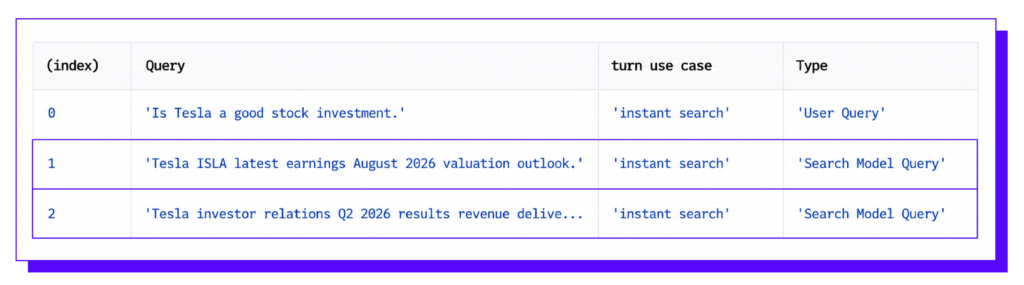
For a query like “Is Tesla a good investment?”, the LLM may do multiple searches in the backend like, “Tesla latest earnings”, “Tesla investor relations”, “Tesla analyst ratings”, then combine everything into one answer. Below is a BTS from Chatgpts query fanning mechanism, the highlighted one’s are the fanned out queries:
AI Citations
When analysing your prompts and building an AEO strategy, there are two distinct signals that are tracked separately. AI citation is the first. It refers to a URL or domain that an AI platform actually references, links to, or attributes as a source within its generated answers.
Brand Mentions
Brand mentions are instances where AI platforms reference a brand name within the answer. Brand mentions may appear with or without a reference link and are not the same as citations.
Markdown
A plain-text format for content that is machine-readable and parseable by agents. It is super lightweight and significantly more efficient than HTML, often dropping the data “payload” size by 5x.
It was created by John Gruber in 2004, and files written in Markdown typically use the .md or .markdown file extension. The explosion of hype surrounding .md is driven by the fact that LLMs process plain text much more efficiently than heavy, proprietary formats.
When an AI agent has to parse through an HTML file, it forces the AI to burn through thousands of extra “tokens” just parsing layout data. A .md file strips out the digital bloat. Below is an example of how these two formats are visible:
- HTML File: https://akarshk10.github.io/html-file-example/
- Markdown File: https://akarshk10.github.io/markdown-file-example/
Google says you can use either (Markdown or HTML); however, when it comes to SEO, HTML is much better, while Markdown only has the benefit of being lightweight, making it easy for AI crawlers (training crawlers like OpenAI, Anthropic, etc.) and other AI search crawlers like Perplexity, Claude, etc.)
Markdown Negotiation
A process where an AI agent requests a Markdown representation of a webpage instead of the usual HTML. The agent indicates that it accepts Markdown through an HTTP request header, and the server responds with the Markdown representation when available. This uses standard HTTP content negotiation, allowing AI agents to consume a lightweight, machine-readable version of the page without downloading and parsing the full HTML.
HTTP Header
An HTTP header is a small piece of information sent along with a web request or response that tells the browser, server, or AI agent how to handle the content.
Accept: text/markdownThis tells the server: “I can accept the response in Markdown format.”
OKF (Open Knowledge Format)
This is yet another Markdown file backed by Google Cloud. In simple terms an OKF is a structured collection of Markdown files that represents a website’s content in a format that AI agents can read directly. Below is a representation of how the library looks, or rather how it needs to be arranged:
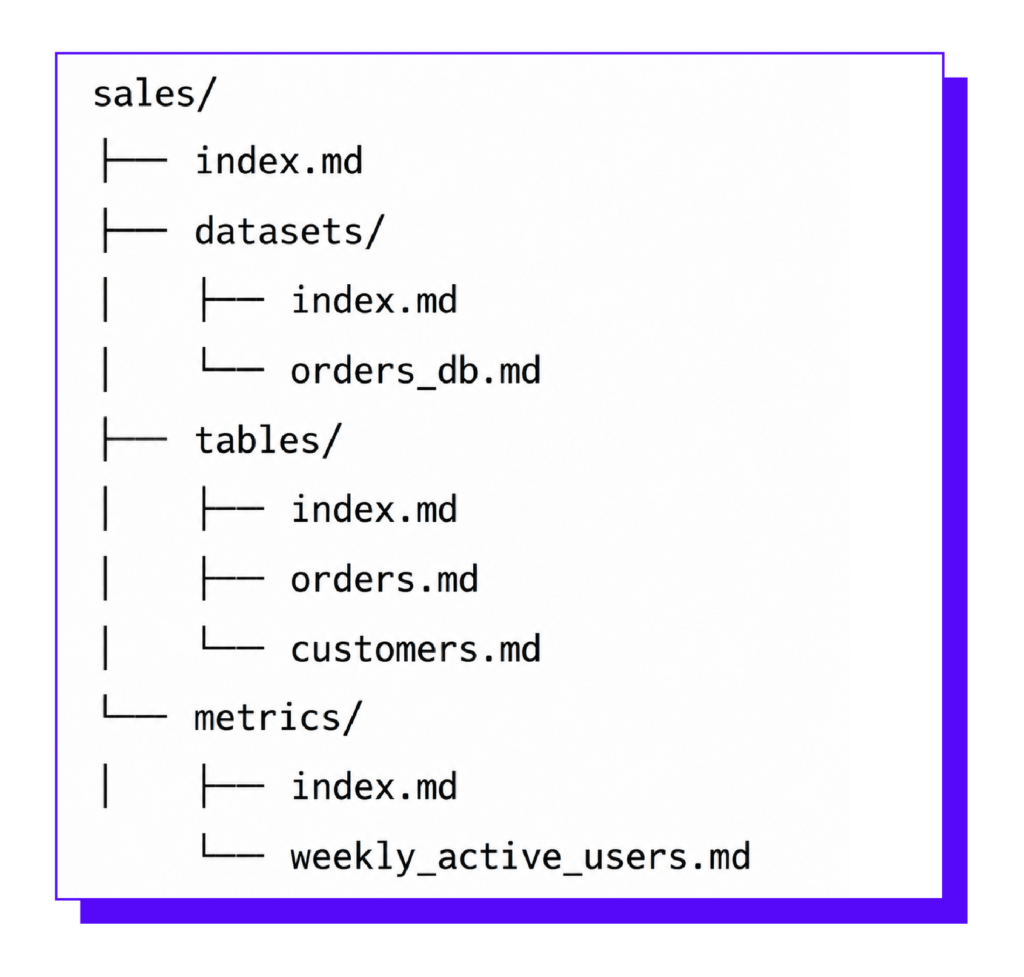
Each file describes a particular piece of content and includes a small YAML front matter block containing metadata such as its type, title, and description. Files can also link to related content, allowing an agent to navigate the collection like a set of interconnected Markdown documents. Because the content is provided directly as Markdown, agents can consume it without having to scrape the website or rely on a custom API integration.
Some important files we should be considering are:
- index.md [treat this as a sitemap; this MD file acts as a doorway to other MD files]
- log.md [treat this also as a sitemap file, but the role is to record the history of changes]
Note: A bundle will not move your rankings or your AI visibility this week. What it does do is make your content effortless to read the day an agent comes looking. The body is clean Markdown with the navigation and ads stripped out.
YAML Frontmatter
YAML frontmatter is a small block of structured data (like “title” or “tags”) placed at the very top of a Markdown file to make it easily queryable by software. “YAML Ain’t Markup Language” (a recursive acronym), though it was originally short for “Yet Another Markup Language”.

llms.txt
This is also a Markdown file placed at your site’s root (e.g., https://dejan.ai/llms.txt) that acts as a “signpost.” It provides a brief summary of the site so AI agents don’t have to crawl every single page to understand its purpose.
From a credibility standpoint and its actual use case, llms.txt doesn’t add a lot of value. Ahrefs recently conducted a study where they analyzed 137K sites and 97% of llms.txt were never read.
Author’s Note: We published an
llms.txtfile on our own domain and intentionally added a single new URL as an “easter egg”. If an AI assistant visited and processed the file, we would know by watching whether that unique URL received any crawl activity.We ran the test for four weeks and watched our server logs. During that period, we did see requests to llm.txt (not llms.txt), even though that file was returning a 404 response. But we saw no meaningful crawl activity from the llms.txt file or the unique URL listed inside it.
We then added the llms.txt URL to the HTTP Link header to make it easier for crawlers to discover. We ran the test again, but the result remained largely unchanged. There was still almost no site-wide crawl activity originating from the URL provided in llms.txt.
It was an inauspicious start, but it taught us an important lesson: when it comes to AEO, don’t rely on assumptions or industry hype. Run your own tests, watch your server logs, and validate the behaviour with your own data before scaling a tactic.
MCP (Model Context Protocol)
MCP is a standardised bridge that allows an AI agent to connect to and use data sources, tools, or applications.
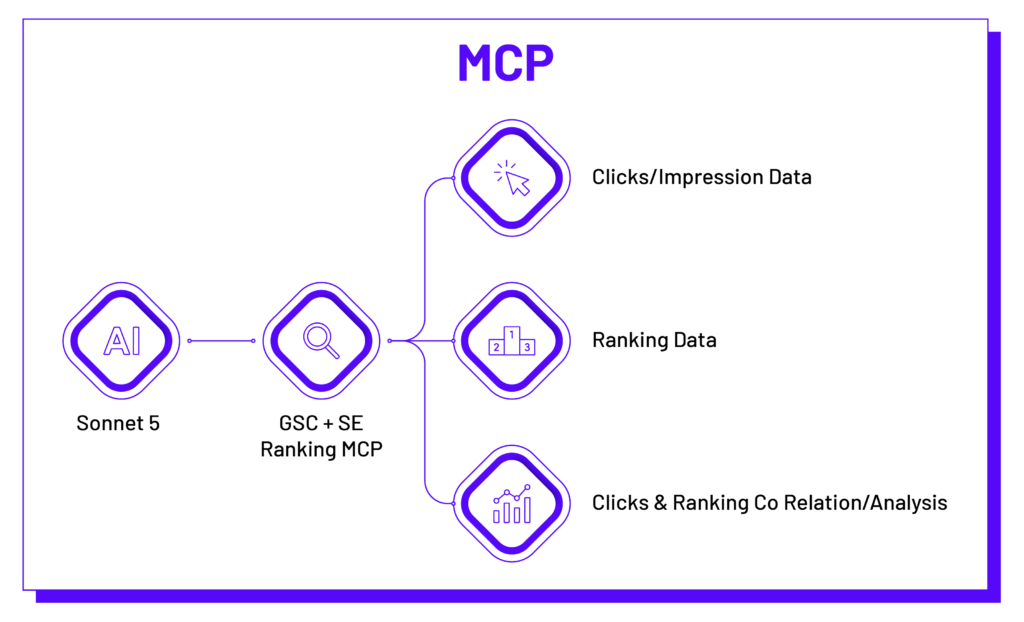
If you’re active on LinkedIn, you may have come across Google Search Console (GSC) MCP and Claude being used for data visualisation and analysis, where if you connect a GSC MCP server to Claude, the MCP acts as the bridge between Claude and your GSC data. Instead of manually exporting reports from GSC, Claude can directly access GSC data and functions via the MCP connection, enabling it to answer questions, analyse performance, and generate insights.
WebMCP (Web Model Context Protocol)
These two are often framed as competing standards, but they solve different problems and can actually complement each other. MCP is primarily used to create a bridge between an AI agent and data or tools exposed by backend systems. This interaction happens on the server, meaning the MCP server can be accessed independently of a user’s browser session.
WebMCP, on the other hand, operates within the browser. It is available when a webpage is open and allows an AI agent to interact directly with the live page the user is viewing. This makes it useful for tasks that require interaction with a website’s current state. For example, an AI agent could use WebMCP to book a restaurant table, hotel room, or flight directly through a webpage based on a single user request.
The two can therefore work together rather than being treated as competing standards.
Agentic Browsing
This refers to the new way AI “surfs” the web. Agentic browsing is a new way for AI to use the web.
The process begins with a user giving the AI a goal (prompt) rather than a series of instructions. For example, instead of manually opening a travel website, entering cities, selecting dates, and comparing prices, the user simply says: “Find me the best flight ticket from Mumbai to Delhi for the 30th of September”
- A Large Language Model (LLM): Understands the user’s request, reasons about the task, and decides what to do next.
- A browser automation system: Opens webpages, clicks buttons, fills forms, scrolls, and navigates websites. This is often powered by tools such as Playwright or browser automation frameworks.
A feedback loop: After every action, the AI observes the updated webpage, determines whether the goal has been achieved, and decides the next action until the task is complete.
This is why websites optimized for agentic browsing need more than good content. They should have semantic HTML, accessible forms, descriptive buttons, proper labels, stable layouts, and reliable rendering so that an AI agent can accurately identify and interact with page elements, just as a human user would.
Accessibility Tree
A hidden map describing every element on a webpage. This is mainly for people who are challenged and need assistive technology and do not see websites and layouts like us. Consider this as a “label”. Below is an example; here you can see how the heading tag is complicated in HTML, but the accessibility tree simplifies it.
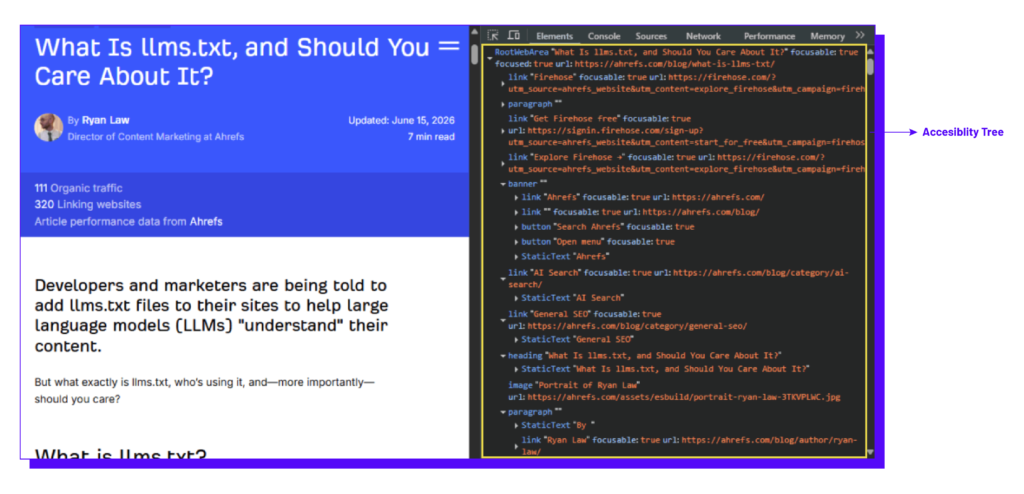
AI agents also see the website in a similar manner. do not read your website the way you do. They do not see your layout, your hero image, or your brand color. They prefer reading the accessibility tree: a stripped-down structural model of the page, the same one that has powered screen readers for two decades.
Semantic HTML
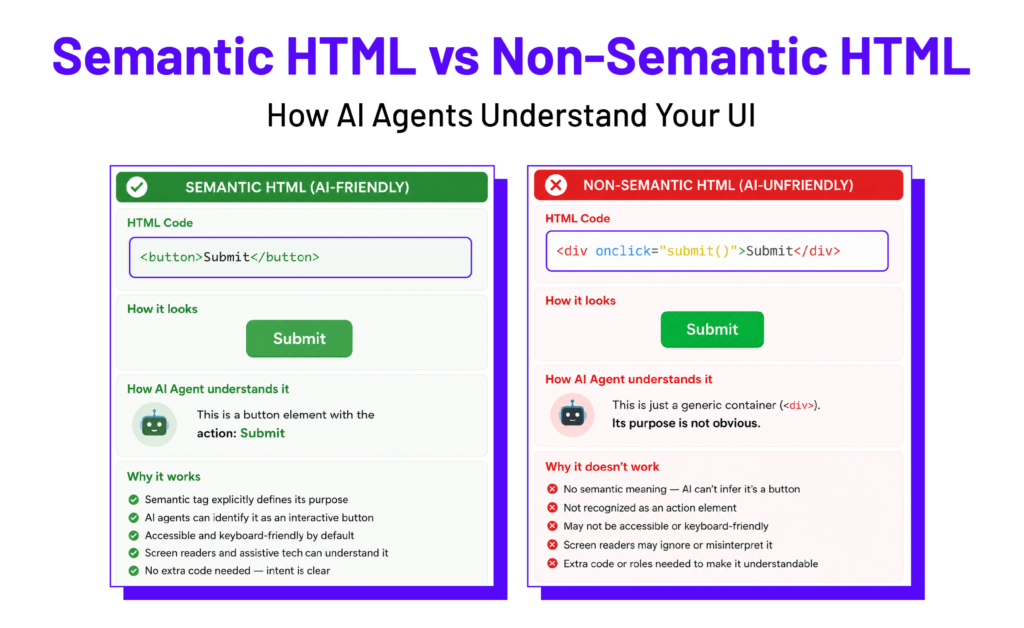
Semantic HTML is using HTML tags for their intended meaning (<button>, <nav>, <main> instead of generic tags like <div>), so accessibility tools and AI agents can correctly identify page structure.
It’s the difference between labeling a button as a “button” versus a generic clickable box, so a bot reading the page actually knows what it’s looking at.
<button>Submit</button> tells an AI agent exactly what that element does. <div onclick=”submit()”>Submit</div> looks identical to a human but is invisible as a “button” to an agent, unless extra code fakes it.
Semantic Search
Semantic search is a search method that understands the meaning and intent behind a user’s query rather than just matching exact words. First, it figures out what you actually want, not just the words you typed. Then it turns words into numbers (vectors) to group similar concepts and ideas together. And lastly, it looks at relationships between words, synonyms, and sometimes user context like location.
Entity
An entity is a well-defined thing or concept, such as a person, place, product, or organization. Entities helps search engines and artificial intelligence understand the real-world object or concept behind a set of words. While a keyword is the literal text or phrase a user types into a search bar, an entity represents the actual meaning, concept, or object those words refer to.
Entity Recognition
Entity recognition, or Named Entity Recognition (NER), is an artificial intelligence tool in natural language processing (NLP). It scans text to find and label key objects. It turns messy text into clean data by sorting names, places, dates, and amounts into clear groups. Below are some of the most common entities:
Person: People’s names like Elon Musk, Virat Kohli, Akarsh Kavuttan
Organization: Company or group names like Google, Apple, Botpresso
Value: Money or percentages like ₹50 or 20%
In case you are working on a content strategy and need help with extracting entities off Google SERP, do check this artcile on Extract Entities for Free to Power Your Content Strategy.
Passage Retrieval
Passage retrieval in AI is the process of finding and extracting specific paragraphs or short sections of text from a document or webpage instead of retrieving the entire page. Some parts of the AEO community also use the term chunking to describe the practice of breaking content into smaller, self-contained sections that AI systems can more easily process, retrieve, and use to answer specific questions.
However, there is ongoing debate within the SEO and AEO community about how much deliberately structuring content into “chunks” actually influences AI retrieval, and whether content chunking should be treated as a distinct optimization practice at all.
Author’s Note: Google introduced Passage Ranking in 2021, a ranking mechanism that helps Google identify and understand relevant passages within a webpage. This means Google can surface a specific passage from a page when that passage is particularly relevant to a search query, rather than relying only on the page as a whole.
From an SEO perspective, we already know that content should be readable, consumable, and structured around the user’s needs. If those principles are followed while creating content, there may be little reason to go back and “chunk” the content specifically for AI retrieval. The priority should remain a good user experience, with content structured naturally in a way that is easy for both users and search systems to understand.
You’ve Taken the First Step Towards Understanding AEO
In conclusion, understanding the terminology behind Answer Engine Optimization is an important first step toward building a strong AI strategy. This glossary covers the key concepts, technologies, metrics, and terminology shaping how AI platforms discover, interpret, retrieve, and cite information. From entities and retrieval systems to AI citations, answer engines, and generative search, having a clear understanding of these concepts can help you make more informed decisions when optimizing your content for AI-driven search.
AEO is evolving quickly, and keeping up with the terminology is only the beginning. The real value comes from understanding how these concepts connect and applying them to your own content, technical SEO, and overall search strategy. If you’re looking to understand how AEO fits into your SEO strategy or need help building an AEO roadmap, Botpresso can help. We work across SEO, content, and AI search to help businesses improve their visibility across traditional and AI-powered search experiences.
If you’re looking for more golden nuggets of SEO wisdom, follow me on LinkedIn for exclusive insights, tips, and real-time updates!
About the Author
Akarsh Kavuttan is an SEO and AI Search professional from India, currently serving as Director of SEO & GEO at Botpresso, where he leads the SEO and AI search research functions.
Akarsh began his SEO journey in July 2018 at a small agency, working closely with a team of two to three people. Over eight years of industry experience, he has worked across BFSI, education, travel and tourism, SaaS, e-commerce, and enterprise, partnering with brands including Thomas Cook India, ICICI Prudential Life Insurance, Orchids International School, John Jacobs, Cleartrip, and Murf AI.
His work has received recognition at the European Search Awards in May 2025, the Economic Times Brand Equity Awards in November 2023, and the DMA Asia Sparkies in November 2022.
In the evolving field of AEO and GEO, Akarsh focuses on hands-on experimentation, tool development, and practical approaches to improving brand visibility across AI-powered search experiences.
An active contributor to the SEO industry, Akarsh regularly shares insights, experiments, and learnings through LinkedIn posts and blog articles, with a focus on advancing industry knowledge through practical research and continuous learning. He was also featured in India’s Rising Search Stars Behind Digital Brands.