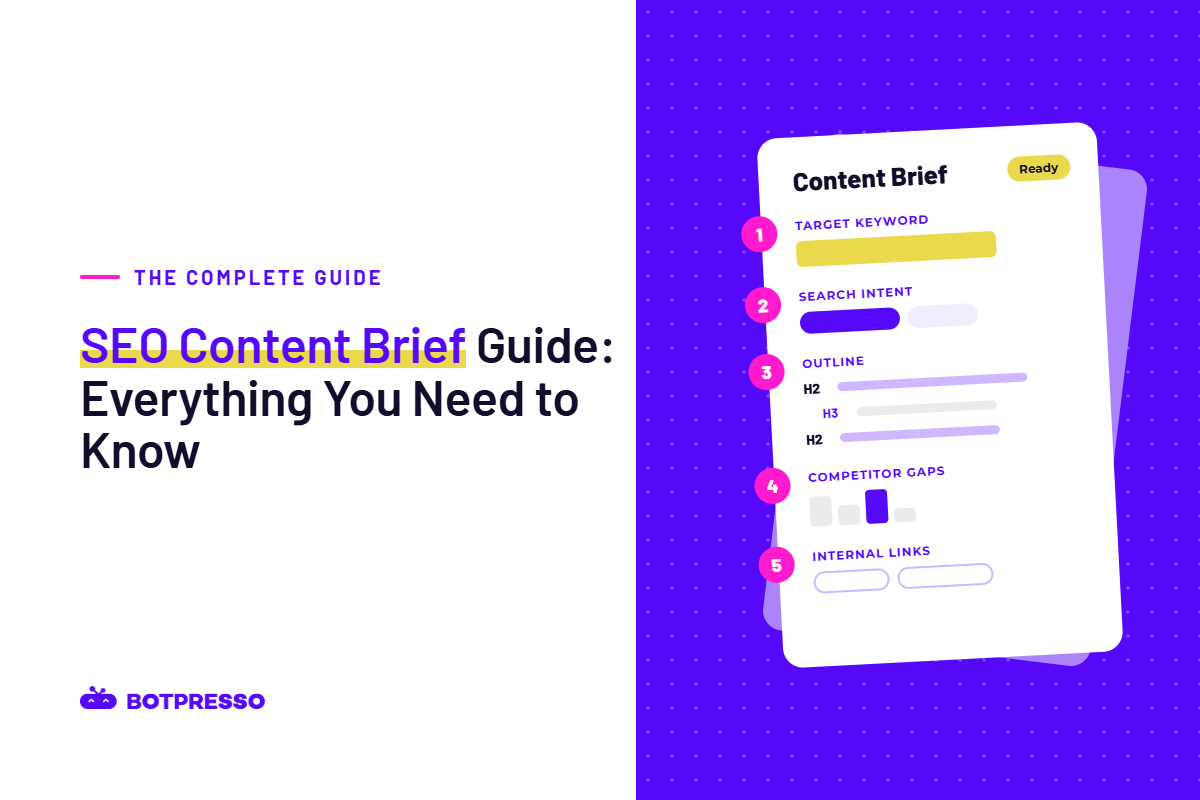
An SEO content brief is a one or two-page document that tells a writer what a page needs to do in search before they write a word: who it is for, what question it answers, what it must cover, and how it connects to the rest of your site. Your SEO usually creates it. A writer, an agency or a freelance vendor works from it.
If your team is about to hand content to a new vendor, the brief is where most of your quality control happens. A vague brief gets you a draft that reads fine but misses the point, and you only find out after two or three rounds of edits.
This guide covers:
- What a brief is and what it is not
- What to include in a brief, and why
- Which fields a vendor must follow and where they can use judgment
- How we build a brief at Botpresso
- How to onboard a vendor in the first 30 days, review their drafts, and stay within Google guidelines
Key takeaways
- An SEO content brief is a one to two-page document, written by the SEO, that tells a writer who a page is for, what it must answer, and how it connects to the rest of the site.
- A complete brief covers eleven fields: business goal, audience, keywords and search intent, search results findings, an outline, topics and questions, links, page metadata, sources, voice and call to action, and a length range.
- Each page should target one primary keyword, supported by a short list of secondary keywords used naturally, never a set number of times.
- Google has no preferred word count, so a brief should give a length range with a reason, not a fixed target.
- When working with a content vendor, the brief should state which fields are mandatory (goal, audience, intent, must-answer questions, links, sourcing) and where the writer can use judgment.
- A vendor’s first 30 days should focus on context and feedback: hand over the style guide and examples, pilot two or three content types, approve outlines before full drafts, then lock the process.
- Vendors who draft with AI should disclose it, use only facts from the brief or named sources, include at least one first-hand insight per page, and have a named person edit every draft.
- Outsourcing content does not break Google’s rules, but outsourcing without editorial oversight can drift toward scaled content abuse or site reputation abuse.
- The simplest way to tell if briefs are working is the share of first drafts that need only light edits.
What is an SEO content brief?
An SEO content brief is a set of instructions for one page. It turns keyword research and a look at the search results into decisions a writer can act on: the reader, the angle, the sections, the links and the proof the page needs.
Think of it as the difference between telling a designer “make us a poster” and handing them the size, the message, the audience and the logo files. Both get you a poster. Only one gets you the poster “you needed”.
Brief vs. content outline
People often use the two words interchangeably, but they do different jobs.
| Content Outline | SEO Content Brief | |
|---|---|---|
| What it answers | What goes where | Why this page exists and what it must achieve |
| Contains | Headings and flow | Headings plus audience, search intent, keywords, competitor gaps, links, sources, and page metadata |
| Who it helps | The writer organising ideas | The writer, the editor, the SEO team, and whoever approves the page |
An outline sits inside a brief. A brief without an outline still leaves the writer guessing about structure; an outline without a brief leaves them guessing about everything else.
Who writes the brief, and who uses it
The person who did the search research should write the brief. That is usually your SEO or content strategist. Writers should not have to make search decisions they were not hired to make.
The brief then has more readers than it used to:
- The writer or vendor, who drafts from it
- The editor, who checks the draft against it
- Subject experts, who add or verify facts
Why briefs matter more when you outsource content
An in-house writer picks up context over months: your product names, which claims legal will reject, which pages already rank. A vendor starts with none of that, and often writes for several clients in the same week. The brief is the only place that context reliably reaches them.
In practice, a good brief does four things for a team working with a vendor:
- Cuts revision rounds: Most rewrites trace back to a decision nobody wrote down, such as the wrong reader, the wrong format, or a missing section. Settling those in the brief is cheaper than fixing them in round three.
- Keeps quality even across writers: If three freelancers work from the same template, the pages read as if they came from one person.
- Teaches the vendor your standards: Each brief shows them where they must follow instructions and where they can use their own judgment. By the fifth brief, they ask fewer questions.
- Protects you from a real risk: Google’s guidance on creating helpful, people-first content asks site owners whether their content is mass-produced or outsourced to many creators in a way that leaves individual pages with less attention or care. Outsourcing itself is fine. Outsourcing without oversight is the warning sign, and the brief is your first layer of oversight.
None of this needs a heavier process. It needs the right ten or so decisions written down before drafting starts.
What to include in an SEO content brief
A complete brief covers eleven fields: business goal, audience, keywords and intent, search results findings, an annotated outline, topics and questions to cover, links, page metadata, sources and expert input, voice and call to action, and length. Each is explained below with the mistake we see most often.
1. Business goal
Start the brief with one line on what the page should achieve for the business, with a number if you have one. “Get 30 newsletter sign-ups a month from marketing managers” tells a writer far more than “build awareness”.
❌Common mistake: leaving the goal out, so the writer defaults to a safe, generic article with no clear next step for the reader.
2. Audience and funnel stage
Describe the reader as a specific group with a specific problem, and say how much they already know. “Marketing managers at mid-size companies who have just been asked to manage an SEO vendor” is usable. “Marketers” is not.
Add the funnel stage: is this reader learning (top of funnel), comparing options (middle), or ready to act (bottom)? It changes the tone, the examples and the call to action.
❌Common mistake: writing for everyone, which produces content that helps no one in particular.
3. Keywords and search intent
- One primary keyword. The main phrase the page should be found for. One page, one primary keyword; two pages chasing the same phrase end up competing with each other.
- A short list of secondary keywords, grouped by the section where they fit naturally. Five to ten is plenty. A list of forty terms tells the writer nothing.
- Search intent. What the person typing the keyword actually wants: to learn something, compare options, buy, or find a specific site.
We put a small keyword table at the very top of our briefs, with the monthly search volume for each term, so the writer can see at a glance which phrases matter most.
❌Common mistake: asking for a keyword a set number of times. Google’s own guidance says to use the words people search for naturally, and warns against keyword stuffing.
4. What the search results show, and the gap to fill
Before writing the brief, the SEO should look at the pages that currently rank and note three things:
- Format: are the top results guides, lists, comparisons, templates or product pages? Match the format unless you have a strong reason not to.
- Common ground: the topics almost every top page covers. Your page needs these too.
- The gap: what none of them does well. This is your angle, and it deserves its own line in the brief, for example, “No ranking page shows examples of how to do it. Include one.”
❌Common mistake: pasting three competitor links with no comment. Writers then copy the structure of whatever they read first.
5. An annotated outline
Give suggested H2 and H3 headings, and under each one add a line or two on why the section exists, which question it answers, and what example or evidence belongs there. Headings alone produce thin sections; notes produce useful ones.
Keep the main answer near the top of the page. Readers and search engines both want the answer before the background.
6. Topics and questions to cover
List the related concepts the page should explain and the questions readers ask. Good sources are Google’s “People also ask” box, autocomplete suggestions, and real questions from your sales or support team. Each one can become a heading, a line in a section, or an FAQ.
7. Internal and external links
Specify the links in a small table so nobody has to guess:
| Anchor Text | Link To | Where It Goes |
|---|---|---|
| content audit checklist | /blog/content-audit-checklist | Section on reviewing drafts |
| book a call | /contact | Closing call to action |
Add any external sources the writer should cite, such as official documentation or original research.
❌Common mistake: “link to relevant posts”, which usually ends with a cluster of links in the last paragraph.
8. Page metadata
Give the writer a draft or direction for:
- Title tag: the clickable headline in search results. Keeping it under about 60 characters stops it being cut off.
- Meta description: the summary under the title in search results.
- URL slug: short, readable, with the main keyword.
- H1: the headline on the page itself.
Character limits here are common practice rather than Google rules, so treat them as guides.
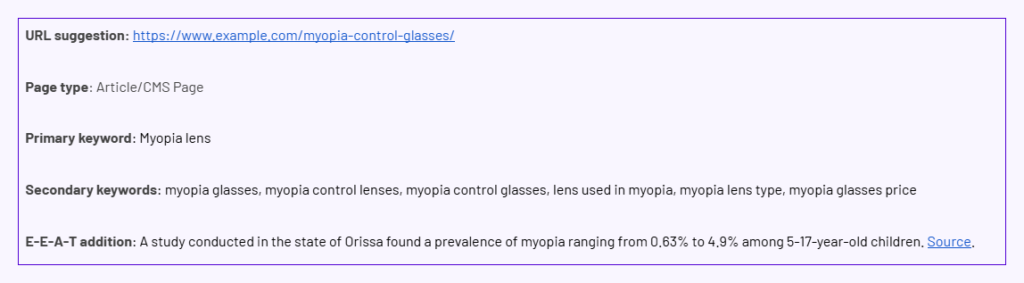
9. Sources, proof and expert input
State what evidence the page needs and where it comes from: your own data, a named expert to interview, official documentation, or published studies. Ask the writer to open and read every source they cite. This matters most for anything touching health, money or safety, where Google expects claims to match expert consensus.
❌Common mistake: letting a writer, or an AI tool, fill missing facts with general knowledge. If a fact is not in the brief or a cited source, it should not be on the page.
Example:
10. Voice and call to action
Describe your voice with examples rather than adjectives. “Friendly but expert” means something different to every writer. A line like “Sounds like: here is what to check first. Does not sound like: unlock seamless growth” is much clearer.
Then, name one call to action that aligns with the business goal from field 1.
11. Length: a range with a reason
Google states plainly that it has no preferred word count, and lists “writing to a particular word count” as a warning sign. At the same time, a writer needs some sense of depth.
Our approach: give a range based on how much the topic needs to cover, and explain it. And also how much depth the top-ranking pages have covered. “About 1,500 to 2,000 words, because the page has to cover eleven fields and a worked example” is useful. “2,000 words” on its own encourages padding.
Which content brief fields are mandatory and which are flexible
A new vendor needs to know which instructions they must follow and where they are trusted to improve on the brief. Spell it out once, in the template itself.
| Brief Field | Mandatory or Flexible | Why |
|---|---|---|
| Business goal and audience | Mandatory | Everything else depends on them. |
| Primary keyword and search intent | Mandatory | Getting intent wrong means a structural rewrite. |
| Questions the page must answer | Mandatory | These are what readers came for. |
| Specified internal links | Mandatory | They connect the page to the rest of the site. |
| Sourcing rules and expert review | Mandatory | Accuracy is not negotiable. |
| Title tag and meta description | Mandatory to deliver, flexible in wording | The writer often finds better phrasing. |
| Heading wording and order | Flexible, with a reason | Good writers improve outlines. |
| Secondary keywords | Flexible | Use where they fit naturally. |
| Examples and analogies | Flexible | This is where the writer adds value. |
| Length | Flexible within the range | Depth should follow the topic. |
We also add a short note to every brief telling the writer that the brief is a starting point, not a ceiling. If they find something more useful than what we listed, we want it, and we ask them to suggest better headings when they see one.
How the SEO team researches a brief before the vendor sees it
Most guides list what goes in a brief but skip how the information is found. This is the process our team at Botpresso follows. You do not need to run it yourself, but knowing it helps you judge whether the briefs your vendor receives are well researched.
Our seven-step brief process
- Define the audience and purpose: Who is this for, how much do they know, and is the page meant to inform, compare or convert?
- Pin down search intent: Search the keyword in a private browser window and look at the top ten results. What format is Google rewarding: a definition, a list, a how-to, a comparison, a product page?
- Research related keywords: Use a keyword tool to find supporting terms and their search volumes. You can also use “People also ask”, autocomplete and “People also search for” sections on Google.
- Study the competition: Note the headings most top pages share and the ones only one or two cover. Then score each gap by business value and effort.
- List the key concepts: Collect the related topics, terms and named things (tools, standards, organisations) a complete page should mention.
- Find something new to add: Look for what the ranking pages lack: original data, a worked example, expert input, real customer questions.
- Write the brief: Headings with notes, the keyword table, the link table, the funnel stage, FAQs and the note inviting the writer to go further.
Where we look beyond the top ten results
The ranking pages tell you what Google rewards today. They rarely tell you what readers are still confused about. For that, we check:
- What the top five results have in common, to understand why Google chose them.
- “People also ask”, autocomplete and “People also search for”, for the follow-up questions readers have.
- Reddit, by searching site:reddit.com plus the topic, to see how people describe the problem in their own words.
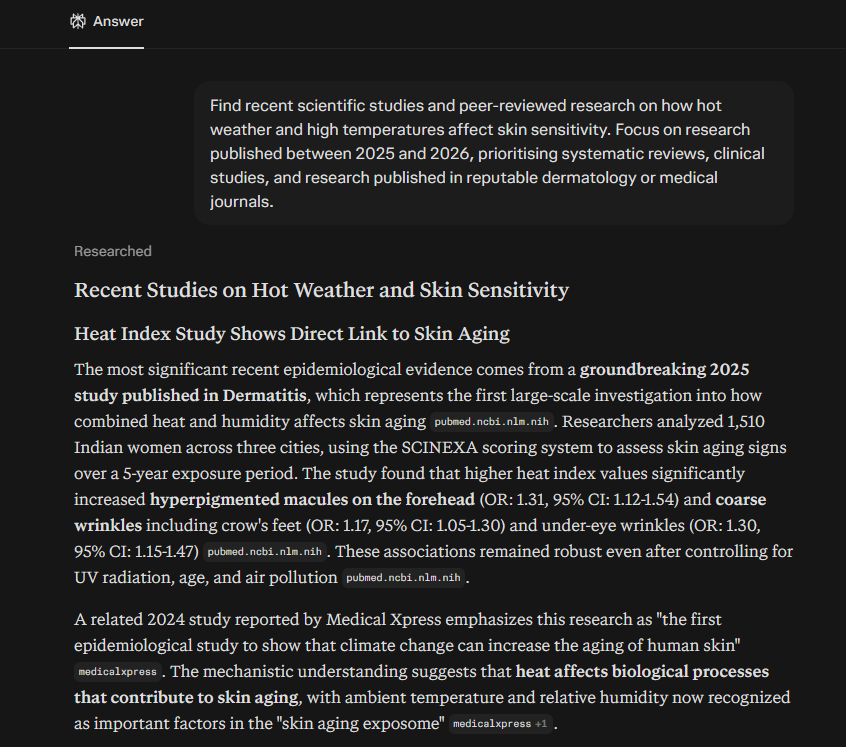
- Perplexity, to find studies or research papers we can cite.
- Google News, for recent changes that make older articles out of date.
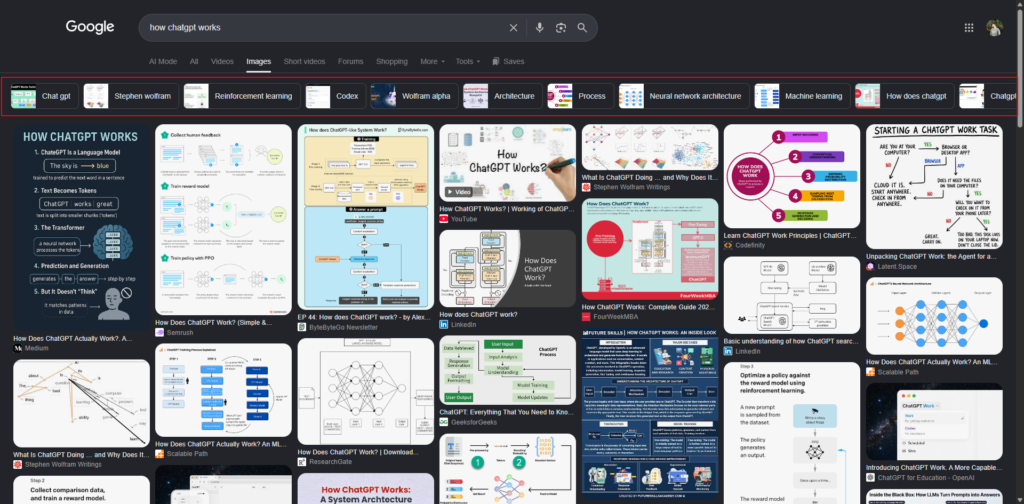
- The topic chips in Google Images. When you search a topic in Google Images, a row of labelled chips appears above the results. Each chip is a subtopic Google has grouped images under, and they often point to sections a text-only search would miss.
Example of Google images:
Example of Perplexity research:
Onboarding a new content vendor: the first 30 days
A good first month gets the vendor from guessing to self-sufficient. Spend it on a small number of pieces and a lot of feedback, not on volume.
Week 1: hand over the context
Before the first brief, send the vendor:
- Your style guide and a short glossary of product names and terms
- Two or three of your best-performing pages, with a note on why they work
- The brief template, including which fields are mandatory
- Your rules on AI use (see the next section)
- Access to the people and sources they will need: a product contact, a subject expert, approved data
Week 2: pilot two or three content types
Brief one piece each of two or three different types, for example a how-to guide, a comparison and an FAQ page. You learn quickly whether the vendor reads search intent correctly and follows instructions.
Week 3: approve outlines first, then calibrate feedback
Ask the vendor to send their outline before they write the full draft. A five-minute outline review saves hours of rewriting.
When you give feedback, separate two kinds of comment:
- Critical: wrong intent, missing required section, unsourced claim, factual error. These must be fixed.
- Preference: wording, tone choices, example selection. Useful, but optional.
Vendors who get both mixed together cannot tell what actually matters.
Week 4: lock the process
Write down what you agreed: approval criteria, turnaround times, how many revision rounds are included, and how often you will review performance together. Update the brief template with any answer the vendor had to ask for more than once.
Rules for vendors who draft with AI
Assume your vendor uses AI for at least part of the work, and set rules rather than a ban. Google’s position, set out in its guidance on AI-generated content, is that it judges content on its value, not on how it was made. What it acts against is large volumes of pages that add nothing.
The weakness of AI drafting is that it can only rephrase what already exists online. It cannot know your product specs, your customers’ questions or your team’s experience. So the first-hand material has to come from people and go into the brief.
These are the rules we set for any vendor producing content for our clients:
- Disclose AI use. Tell us which parts were drafted with AI.
- Facts come from the brief or a named source. Never from the AI tool and never from “general industry knowledge”. AI tools can invent or misattribute studies, so the writer opens every source they cite.
- At least one first-hand insight per page. A real customer question, a product detail, a test, an expert comment. If a page has no unique input, it should not be written.
- Nothing invented. No made-up reviews, tests, case studies, authors or expert quotes.
- A named person edits every draft after the AI step, and their name is recorded.
- No filler phrases. Lines like “in today’s fast-paced world” or “a game-changer” are an instant sign of an unedited draft.
Outsourced content and Google’s spam policies
Using a vendor does not break any Google rule. Two of Google’s spam policies are worth knowing, though, because a badly managed vendor relationship can drift toward them.
- Scaled content abuse: Publishing many pages mainly to rank, with little value for readers, however they were produced. A vendor producing fifty near-identical location or category pages from one template is the classic risk. The fix is in the brief: each page needs its own reason to exist and its own specific detail.
- Site reputation abuse: Publishing third-party content on a trusted site mainly to borrow that site’s ranking strength. Google has said that third-party content on its own is not a violation; the problem is content that exists to exploit the host site’s reputation. Google updated this policy on 28 August 2026, changing how manual actions apply to searchers in the European Economic Area from 30 August. The policy itself still applies.
For most brands working with a writing vendor, staying safe comes down to editorial oversight you can point to:
- Every page has a brief written by your team
- Every draft is edited by a named person
- Facts are checked against your own sources
- Each page is written for your audience, on topics your site is genuinely about
If a page would not be worth publishing without your site’s name on it, do not publish it.
How to review vendor drafts and measure whether briefs work
Review each draft against the brief, not against your personal taste. A short scorecard keeps reviews consistent across editors.
A pre-publish scorecard
Before a page goes live, check that:
Tools help with the mechanical checks: a grammar checker such as Grammarly or LanguageTool, a readability checker such as Hemingway, and a plagiarism checker such as Copyscape. They do not replace an editor’s judgment on accuracy and usefulness.
Measuring the vendor
Look at five things over time, not just rankings:
- Brief compliance: did the draft cover the intent, required sections and links?
- Editorial quality: is it accurate, clear and useful?
- Search results: are impressions, clicks and organic visibility for the target terms rising? Check in Google Search Console.
- Business results: sign-ups, leads or sales linked to the page.
- Working relationship: deadlines met, feedback applied, fewer revisions over time.
Rankings depend on factors a vendor cannot control, so set targets against your own baseline and give pages a few months.
Measuring the brief itself
Two simple signals tell you whether your briefs are good enough:
- First-draft acceptance rate: If drafts regularly need structural rewrites rather than light edits, the brief left something out.
- Repeated questions: If writers keep asking the same thing, add the answer to the template.
Adjusting the brief for different content types
Keep one base template, then add a few fields based on the page.
| Content Type | Add to the Base Brief |
|---|---|
| How-to guide | The exact steps in order, what the reader needs before starting, and whether numbered steps or prose suit the topic. |
| Comparison page | The options being compared, the criteria to compare on, and where your own product fits honestly. |
| Supporting article in a topic cluster | The main (pillar) page it must link to, and the sibling articles to cross-link. |
| FAQ or definition page | The exact questions to answer, each in two or three sentences that can stand alone. |
| Product or category page | Verified specs and prices from the product team, who the product suits and who it does not, and delivery and returns details. |
For product and category pages in particular, avoid reusing the same intro and “why buy from us” block across pages. Each page should speak to its own buyer.
Writing content briefs for AI search
More people now get answers from ChatGPT, Google’s AI Overviews and similar tools, which pull passages from web pages and cite them. You do not need a separate brief for this. One extra field helps.
Add an “answer first” line to each section of the outline. Write the one or two sentences the section should open with: the direct answer to its heading. AI tools and readers both pick up a clear answer more easily than one buried in the third paragraph.
Beyond that, the basics already in the brief do most of the work:
- Clear headings that match the questions people ask
- Short, self-contained answers under each heading
- An FAQ section for follow-up questions
- Specific facts with sources, rather than general claims
💡Read how ChatGPT & Perplexity rank a website.
FAQs
How long should an SEO content brief be?
One to two pages is usually enough. It should be detailed enough that a writer can draft without asking basic questions, and short enough that they still use their own judgment. A ten-page brief tends to produce stiff, uniform content.
Who should write SEO content briefs?
The person who did the search research, usually an SEO or content strategist. Writers can write their own briefs only if they also have the SEO skills to read search intent and competition.
How detailed should a brief be for an experienced vendor?
Keep the mandatory fields the same for everyone: goal, audience, intent, must-answer questions, links and sourcing rules. Experienced vendors can get lighter outlines and more freedom on structure and examples.
Can AI create SEO content briefs?
AI tools can speed up research, such as collecting competitor headings or related questions. The decisions that make a brief useful, such as the angle, the audience and what your brand can add, still need a person who knows the business.
Should writers see keyword search volumes?
Yes. A small keyword table with volumes shows the writer which terms matter most, so they can prioritise without overusing any of them.
How do you know if your briefs are working?
Track how many first drafts need only light edits, and note the questions writers ask repeatedly. Fewer structural rewrites and fewer repeat questions mean the brief is doing its job.
Sources
- Creating helpful, reliable, people-first content, Google Search Central
- Spam policies for Google web search, Google Search Central
- Update to the site reputation policy, Google Search Central Blog, 28 August 2026
- Google Search’s guidance on generative AI content, Google Search Central
- SEO Starter Guide, Google Search Central